WORKSHOP · OPERATIONS · WS·04

GitHub for CEOs

GitHub is the operating system for software work — system of record, collaboration loop, automation layer, governance boundary, and AI agent workspace. 12 slides, 40 minutes.

12 SLIDES · ~40 MIN · PLAYBOOK OVERVIEW
Key Takeaways
  • Your prompts and skills become a library that compounds — not a folder that decays.
  • Create one private GitHub repository called your-firm-ai-library. Free, takes ninety seconds. The library now exists.
  • GitHub is the operating system for software work — system of record, collaboration loop, automation layer, governance boundary, and AI agent workspace. 12 slides, 40 minutes.
WORKSHOP · DEEP DIVE

GitHub for CEOs

Your prompts and skills become a library that compounds over years — not a folder that decays.

BuildClub Academy
01 · WHY THIS MATTERS

Your best prompt is gone. Or worse — you have nine versions of it.

1
The lost prompt
Last month you wrote the perfect instruction for your AI assistant. Today it's somewhere — in a Slack DM, a Notion page, a draft email, or your head. You can't find it. You re-prompt from scratch and the output is worse.
2
The drift
You've been refining a system prompt for six weeks. Three teammates have copies. Each has tweaked it. You no longer know which version is canonical or which produced the result everyone references.
3
The regression
Last week your agent worked. This week it doesn't. Someone — maybe you — edited the instructions. You'd revert if you could, but there is no revert button. There is only the current version and the memory of better days.
4
The library that wasn't
Your firm has accumulated hundreds of useful prompts, agent skills, and operating instructions. They live in a hundred places. None of them compound. Each new hire rebuilds from zero.

These are not novel problems. They are the same problems software teams solved twenty years ago. The tool they built is sitting right there, free, and you are probably not using it yet.

02 · THESIS

Your prompts and skills become
a library that compounds
not a folder that decays.

The Thesis
03 · VOCABULARY

Eight GitHub words in plain English.

Repository
Your library. One folder that holds all the prompts, skills, and instructions for a project — plus every version ever saved.
Commit
A saved change with a timestamp, author, and a short note. Each commit is a moment you can return to.
Branch
A safe copy of the library where you can experiment with a new prompt without affecting the version everyone else is using.
Pull request
A proposal to update the canonical library — opened for discussion and review before the change is accepted.
Issue
A work item or open question — 'this prompt sometimes hallucinates,' 'we need a skill for X' — visible to the whole team.
Workflow
An automated process that runs on every change — for code it runs tests; for prose it can lint formatting, check links, or notify a reviewer.
Markdown
Plain text with light formatting. The native format for prompts, skills, and agent instructions. GitHub renders it beautifully.
Diff
The literal line-by-line difference between two versions. Lets you see exactly what someone changed and why.
04 · THE LIBRARY

A repository is your library — files, history, and access boundary in one container.

1
Files
The current state. For a prompt library: every .md file you depend on, sitting in folders that make sense to you.
2
History
Every saved version, ever. You can read the prompt from six months ago as easily as today's. The library has memory.
3
Access
Public, private, or internal. You decide who reads, who edits, who approves. Compliance starts here.
4
Context
Issues, discussions, and pull requests live next to the files. The reasoning is preserved alongside the artifact.
REPOSITORY — FILE TREE + COMPLETE HISTORY + ACCESS RULES
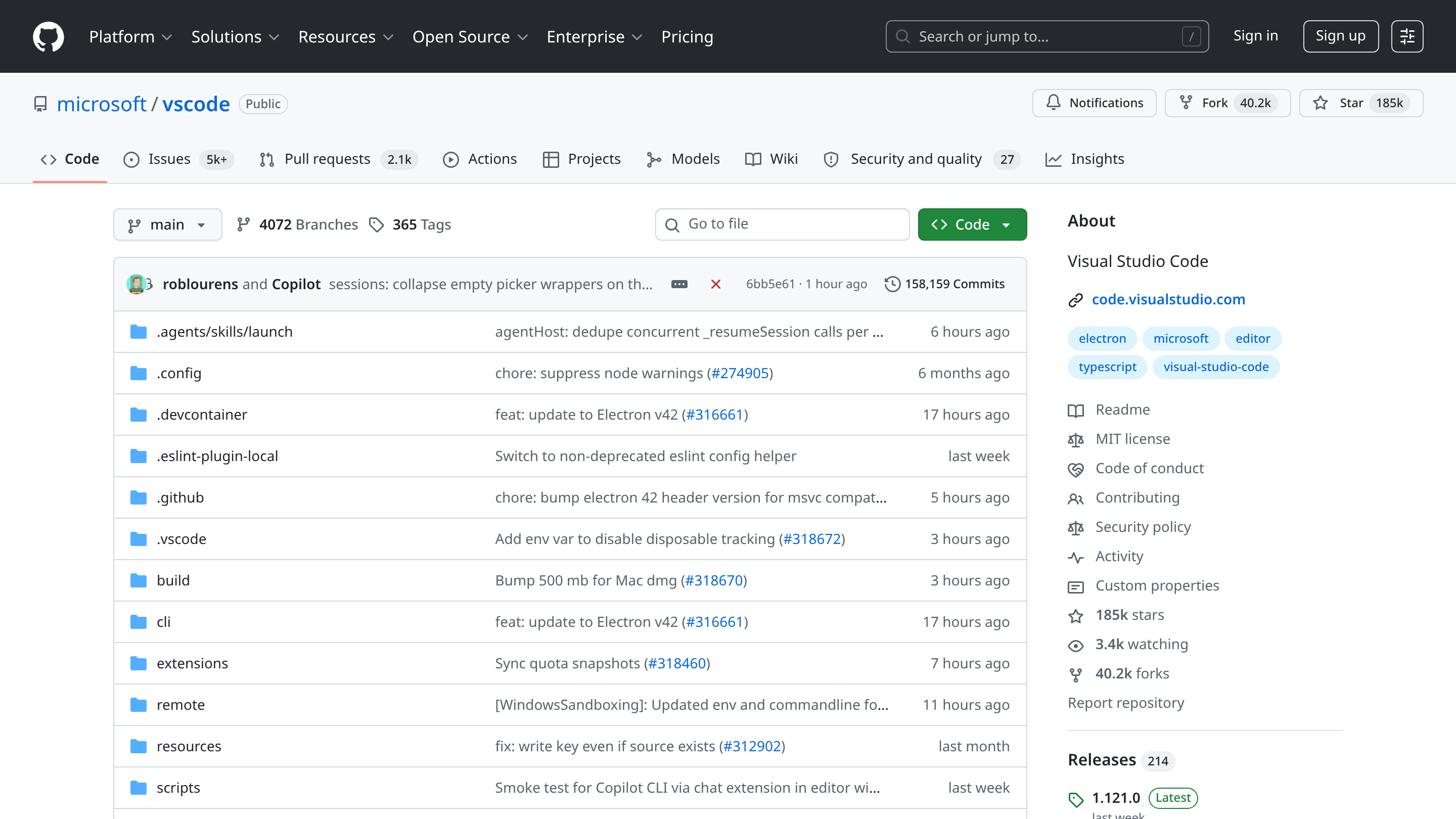
A repository is your library — files, history, and access boundary in one container.
Public example: github.com/microsoft/vscode — files on the left, current state at the top, history one click away.

Same repository view whether you're storing TypeScript source or the markdown skills your AI agents read. GitHub doesn't care about the file extension.

05 · THE CHANGE LOG OF YOUR THINKING

Commits: every saved version, with a note and a who-and-when.

1
Every save is a moment
Each commit captures the file at that instant, with a short message explaining the change. You can return to any moment, ever.
2
The why is preserved
Commit messages — 'tightened the role description,' 'reverted the verbose closer' — become the change log of your thinking. The reasoning compounds with the artifact.
3
Rollback is free
A prompt regressed? Find the commit where it last worked. Restore in two clicks. The 'oh no, what did I just change' question always has an answer.
4
Compare two moments
The 'diff' view shows exactly what changed between any two versions — side by side, line by line. Perfect for figuring out which edit broke things.

If you've ever wished your prompts had a 'track changes' that actually worked, the engineering world has had it since 2008. It's called a commit.

06 · REVIEW BEFORE YOU SHIP

Branches and pull requests: experiment safely, publish deliberately.

1
Branch — the experiment
A safe copy of your library. You can rewrite a prompt, test it with your agent, iterate freely. None of this touches the canonical version anyone else reads.
2
Pull request — the proposal
When the experiment is good, you open a pull request: 'here's what I changed, here's why, please review.' The library has a front door.
3
Review — the conversation
Teammates comment line-by-line. They suggest edits. They approve. Or they push back. The change is discussed before it ships, not after.
4
Merge — the publish
Once approved, the proposal is merged into the canonical library. Everyone now reads the new version. The history records who reviewed and when.
5
Same flow for code
When your engineering team ships software, they use exactly this loop. The discipline applies upward — to your prompts, to your operating playbooks, to any document that matters.
PROPOSED CHANGE → DISCUSSION → AUTOMATED CHECKS → APPROVAL → MERGE
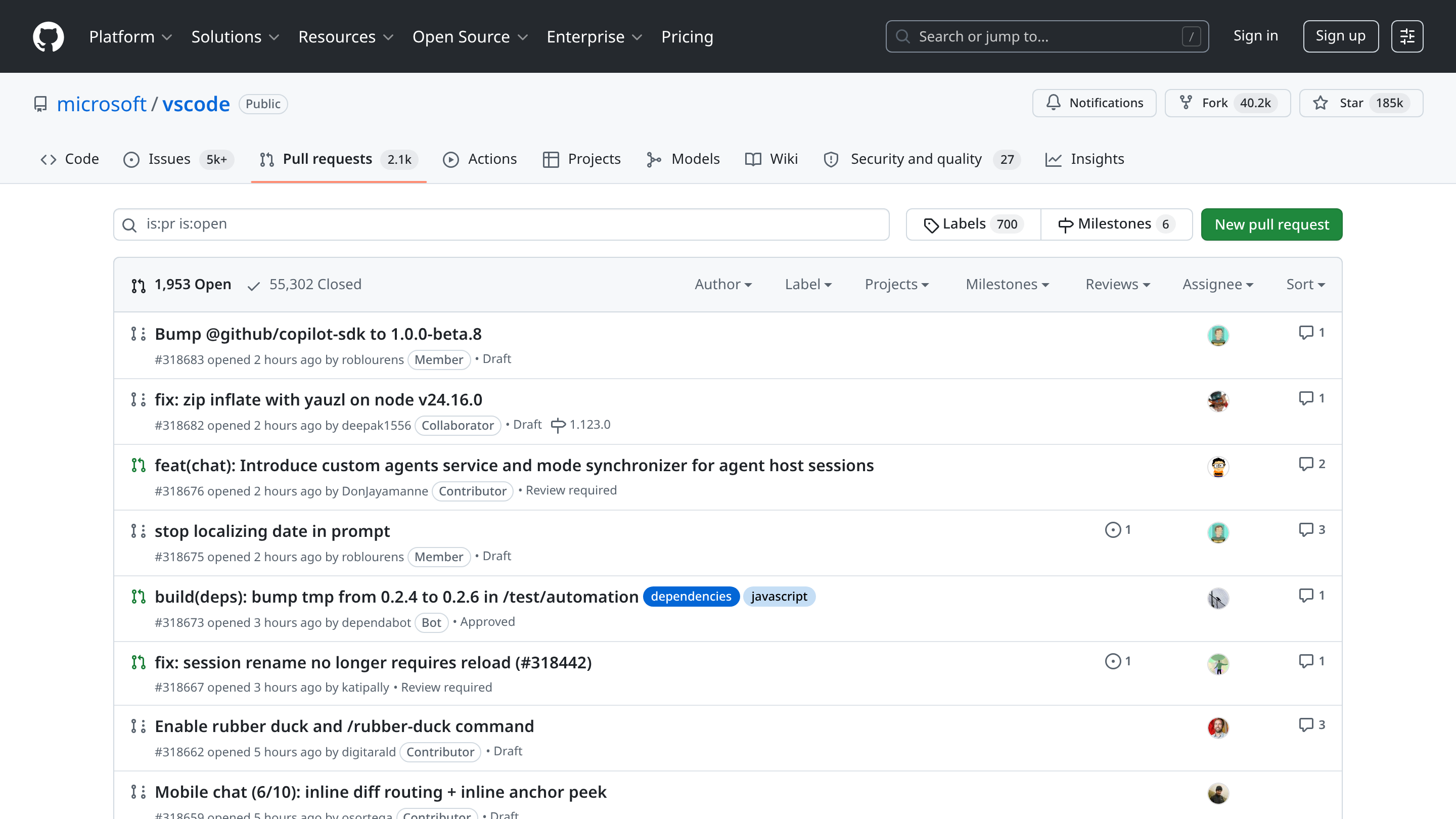
Branches and pull requests: experiment safely, publish deliberately.
Public example: github.com/microsoft/vscode/pulls — each row is a proposed change waiting for review. Same view whether the proposal is a code edit or a refined prompt.

This is the difference between editing a Google Doc 'live' and submitting an edit for review. For high-stakes documents, the review version is what professional teams use.

07 · AUTOMATION LAYER

Actions: automation works on prose too — not just code.

1
2
3
4
5
1
Event
Something happens — a prompt is edited, a skill is added, an issue is opened, or a scheduled time arrives.
2
Workflow
A simple recipe in the repo describes what should happen automatically. Free to write, free to run, free to read.
3
Action
The recipe might lint the markdown, run the prompt against a model to check the output still looks right, notify a Slack channel, or sync the file to another system.
4
Result
Pass, fail, notify, deploy. The library stays consistent without anyone having to remember to do anything.
5
Bridge to software
On the engineering side, the same machinery runs the tests, builds, and deployments your CTO talks about. Same plumbing, applied to text or to code, with no new tool to learn.

Most CEO prompt libraries are a folder. A small amount of automation turns the folder into a system: lint on save, alert on regression, refresh the agent when a skill is updated.

08 · THE AGENT WORKSPACE

Your AI agents can read and write to your library too.

1
Agents read
Modern AI tools — Claude, Cursor, custom agents, even Copilot — can be pointed at a GitHub repository and pull skills, prompts, or context directly from it. Your library becomes their library.
2
Agents write
Agents can also commit. They can propose updates to a prompt, add a new skill they wrote, file an issue when something looks broken. They participate in the same workflow your team does.
3
Human in the loop, by default
Every agent-authored change shows up as a pull request — a proposal awaiting review. You see what the agent wrote and why, and you approve or reject before anything ships.
4
The repo as runtime
When the agent runs, it doesn't just have a prompt — it has the entire current state of your library, including last week's lessons. The library is the operating context.

A repository full of well-curated markdown is becoming one of the most valuable strategic assets a CEO can build. It is the brain your future agents will read from — and contribute to.

09 · THE CONTROL PLANE

Governance: encode who can change what, and under what conditions.

Protected library
The canonical version of a prompt can only be changed through a reviewed pull request — never by editing the live file directly. The library has a front door, and the door has a lock.
Required reviewers
Sensitive prompts (compliance language, customer-facing instructions, agent guardrails) require approval from a named owner. Accountability is encoded in the system, not in a hope.
Required checks
Automated checks must pass before merge — markdown well-formed, links valid, regression tests against a known good output. Pass-or-block, enforced.
Same controls, code side
Engineering uses these exact mechanisms for code. Extending them to prompts and skills doesn't add a new discipline — it applies the existing one to the new artifacts.

Governance for prompts is not a separate stack from governance for code. It's the same tool, configured for the same outcome: change happens with visibility, accountability, and reversibility.

10 · CEO INSPECTION

Five questions to ask your team.

1
2
3
4
5
1
Where does our AI library live?
Where are our system prompts, skills, and agent instructions actually stored today? If the answer is 'in a few people's heads and a Notion page,' the library doesn't yet exist as an asset.
2
Can we see the history?
If a prompt regressed last Tuesday, can we find the version from last Monday? If the answer is no, we have no version control.
3
Who reviews changes?
When a customer-facing prompt is updated, does anyone other than the author see it before it ships? If not, we have no review discipline.
4
Do our agents use it?
Are our AI agents reading from this library at runtime, or do they have their own private copies that drift? The library only compounds if it's the source of truth.
5
What's protected?
Which prompts can be changed without review? If sensitive customer-facing or compliance language can be edited live, that's the first thing to lock down.

Ask the team to show, not tell. One prompt. One commit history. One pull request. One protected file. Forty-five minutes of reality.

11 · MONDAY-MORNING ACTIONS

Five moves for Monday morning.

Monday Morning
  1. 1
    Create one private GitHub repository called your-firm-ai-library. Free, takes ninety seconds. The library now exists.
  2. 2
    Drop in three markdown files this week: your most-used system prompt, one agent skill, and one operating playbook. Don't wait until you have a perfect set — the discipline starts with three files, not three hundred.
  3. 3
    Make one commit a day for two weeks — even small edits. The point is the muscle memory: every meaningful change becomes a saved version with a one-line note.
  4. 4
    Designate one human reviewer for the library. Any change to a customer-facing prompt opens a pull request and waits for their thumbs-up before it merges.
  5. 5
    Point one AI agent or tool at the repository. Claude, Cursor, a custom assistant — pick one. Watch what it does when its instructions are version-controlled.
WS·04 · Questions CEOs Ask

Frequently Asked Questions

What is the core idea of GitHub for CEOs?
Your prompts and skills become a library that compounds — not a folder that decays.
What should a CEO do Monday morning after reading GitHub for CEOs?
Start here: Create one private GitHub repository called your-firm-ai-library. Free, takes ninety seconds. The library now exists; Drop in three markdown files this week: your most-used system prompt, one agent skill, and one operating playbook. Don't wait until you have a perfect set — the discipline starts with three files, not three hundred; Make one commit a day for two weeks — even small edits. The point is the muscle memory: every meaningful change becomes a saved version with a one-line note.
What are the steps in GitHub for CEOs?
1) Event; 2) Workflow; 3) Action; 4) Result; 5) Bridge to software.
Where do the claims in GitHub for CEOs come from?
The playbook cites GitHub Docs — About repositories; GitHub Docs — Understanding GitHub Actions; GitHub Docs — About commits; GitHub Docs — About pull requests.
00 / 12